What building a patient education site for a rare cancer taught us about clinical research site websites. Six practical lessons and a free self-check.


This fall we built a patient education website for people living with a rare cancer. Nobody on it was selling anything. The whole job was to help a frightened person understand a diagnosis, find experienced care, and walk into the next appointment better prepared.
Halfway through, we noticed something. Almost every decision we made there applies to a clinical research site website too.
Your visitors are often in a similar place. Someone has just heard the word “study” from a doctor or a friend. They are reading on a phone, maybe late at night, trying to decide whether you are safe to call. A sponsor is looking at the same pages from the other side, asking whether your site looks organized enough to trust with a trial.
Not every healthcare lesson transfers. As we argued in Digital Patient Experience in Clinical Research Is Not the Problem Hospitals Solved, hospital playbooks were built for a different person. The six lessons below held up because a patient education site, like a research site, talks to someone who is still deciding. For each one, we show what it means for a research site.
Short answer: A patient-friendly clinical research site website answers visitor questions in plain language, shows who is behind each study, works well on a phone, tracks carefully, and is easy for your own team to keep current. We learned all six habits building a patient education site for a rare cancer.
1. How should you organize a clinical research site website?
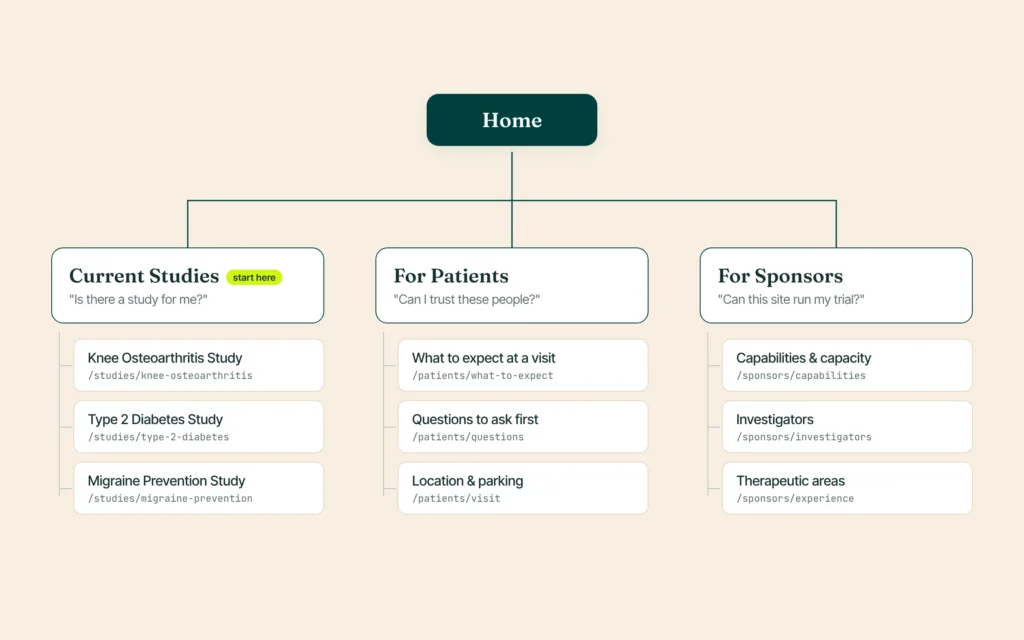
Organize it around the questions visitors bring, not around your internal structure.
On the cancer site, we started from the reader’s questions: What is this? Where do I find the right doctor? How do I live with it? Each question became a parent page, with focused child pages under it and clean URLs to match.
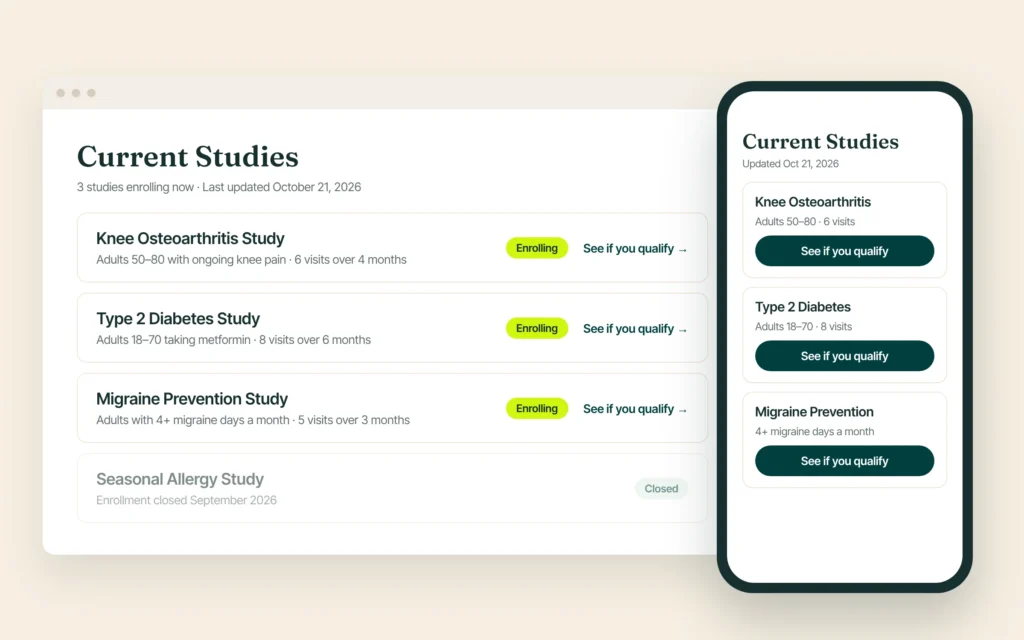
For your research site: most visitors arrive with one of three questions. Is there a study for me? Can I trust these people? (Sponsors ask: can this site run my trial?) Give each question a clear home, such as Current Studies, For Patients and For Sponsors. Keep every study page under one path, like /studies/study-name, so it is easy to find. When a study closes, mark it Closed instead of deleting the page.
2. How can you help patients prepare before they call?
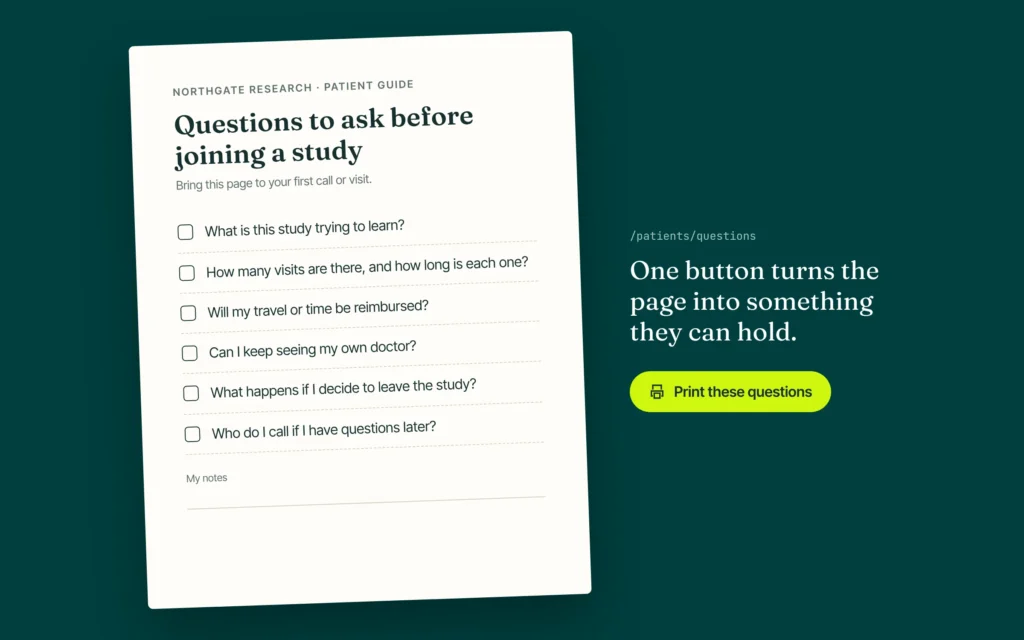
Give them something to prepare with, such as a printable list of questions for the first conversation.
One small feature got the most love in review: a “Print these questions” button. It turns a list of questions into a clean page a patient can bring to an appointment.
For your research site: a first call with a coordinator can feel like an interview. A printable “Questions to ask before joining a study” page lowers that anxiety. It also shows you expect informed, careful participants. You can point readers to the NIH’s plain-language basics on clinical research as a companion. For the wider recruitment picture, see Clinical Trial Patient Recruitment: 12 Truths for 2026.
3. How do you show visitors your site is trustworthy?
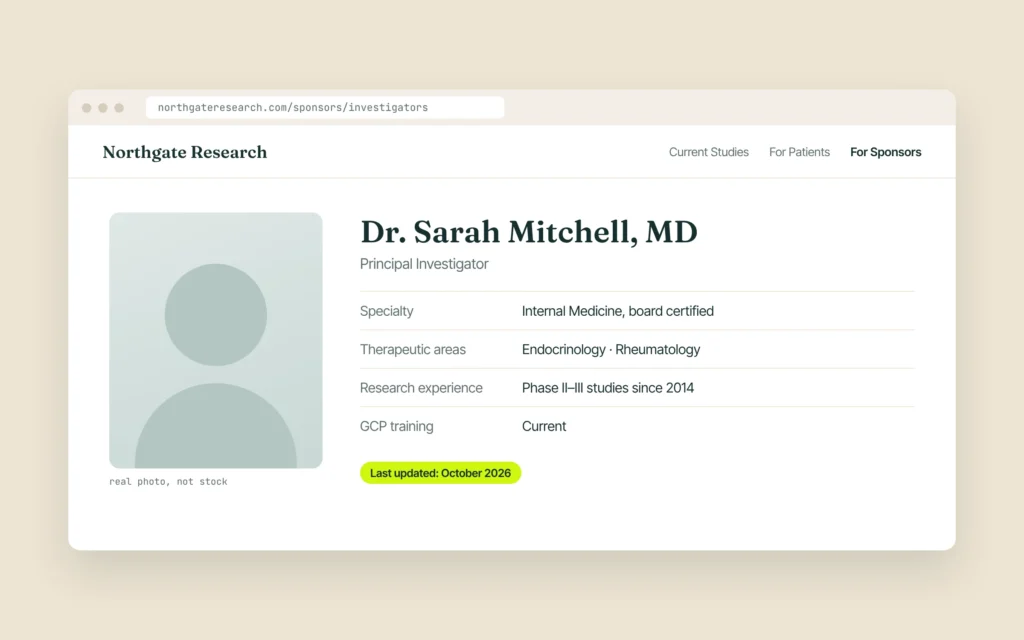
Show where your information comes from: real sources, real people, real credentials and a visible update date.
The homepage included a references section, built as a simple accordion. Medical claims had visible sources, without cluttering the page.
For your research site: the same instinct builds trust for both audiences. Show investigator credentials and real photos. Add a “last updated” date to study pages. Name the therapeutic areas you have actually worked in. Quiet, checkable details beat big claims. For the sponsor side in more detail, read what a CRO site selector sees in the first 60 seconds.
Patients may skim your credentials. A sponsor will read every line.
4. Why does accessibility matter on a research site?
Many visitors may be older, anxious or reading on a small screen, and an inaccessible site quietly turns them away.
On the cancer site, many readers were tired or anxious, and some had vision problems. Every page went through its own accessibility check, on desktop, tablet and phone, before launch.
For your research site: your visitors often face the same limits. Readable type sizes, strong contrast, clear labels on form fields and keyboard-friendly menus are not extras. The W3C’s WCAG guidelines are the common reference point. If you want a second check on your own site, our accessibility audit tests it against WCAG 2.2 AA.
5. What should a research site website track?
Only what you need, with a clear reason for each script, and the most care on pages with forms.
We set up cookie consent and tag management deliberately, instead of pasting in every script a vendor offers. On a health site, what you track matters as much as what you show.
For your research site: a pre-screening form on a page full of ad pixels deserves a second look. HHS has published guidance on online tracking technologies for HIPAA-covered entities. A federal court vacated part of that guidance in June 2024, as the HHS page itself notes, so treat this as a conversation for your compliance lead, not a design detail.

6. How do you keep the site fast and current?
Keep scripts and images lean, test speed after each change, and build pages your team can update in minutes.
We trimmed scripts and plugins, used modern image formats, and tested speed after every major change. We also built the pages from reusable blocks, so the client’s own team can edit content without breaking the layout.
For your research site: speed is the first trust signal, especially on a phone. Our technical SEO guide for clinical trial websites covers the fixes that matter most. And an outdated study list hurts twice. Patients call about a closed study, and sponsors see a site that is not paying attention. If your team cannot update a study page in ten minutes, the site will drift.
A quick self-check for your site
Open your site on your phone and walk through it as a first-time visitor. (This is the same list we use when we review research site websites.)
- Can I tell within a few seconds which studies are open now?
- Does each study page say, in plain words, who it is for and what happens next?
- Is the pre-screening form short enough to finish on a phone?
- Is there something I can print or save before calling you?
- Do investigator pages show real people, real credentials and a recent update?
- Do I know which tracking scripts load on the form pages, and why?
- Can my team update or close a study page without calling a developer?
Want to see how other sites do? The Trialsfocus Site Website Report 2026 looks at how US clinical research site websites actually perform.
Common mistakes we see
- Writing for yourself. Service lists and internal jargon instead of answers to visitor questions.
- One page for everyone. Patients and sponsors forced through the same path, so neither finds what they need.
- Stale studies. Closed trials still shown as enrolling months later. Mark them closed and move them down the list; don’t delete the page.
- Big claims, no proof. “Leading research center” with no names, photos or dates behind it.
- Desktop-only thinking. Forms and tables that look fine on a monitor and break on a phone.
Frequently asked questions
What should a clinical research site website include?
At minimum: a current list of open studies, a short pre-screening or contact form, investigator and team profiles, location and visit details, and a separate path for sponsors and CROs. Everything else supports those pages.
Do patients and sponsors need different pages?
Yes, usually. They ask different questions. Patients want to know if a study fits them and if you are safe to call. Sponsors want evidence of experience, capacity and organization. Shared pages are fine, but each group needs a clear path.
How often should study pages be updated?
Whenever a study opens, pauses or closes. A “last updated” date on each study page helps visitors and keeps your team honest.
Is accessibility a legal requirement for my site?
It can be, depending on your organization and how you serve the public. Either way, accessible design helps the people you most want to reach. Ask your counsel about your specific obligations.
The short version
A patient education site and a clinical research site website have the same core job: help a nervous person take one careful next step.
- Structure pages around visitor questions, not your org chart.
- Give people something to prepare with before they call.
- Show real sources, real people and real dates.
- Design for older, anxious and mobile readers from day one.
- Track less, and know why each script is there.
- Keep it fast, and make updates easy for your own team.
If you want a second pair of eyes on your site, we are happy to walk through it with you using the checklist above. No pitch, just notes you can use. Book a 30-minute website review.